
Page Layout
—And site structure
If you use simplybible.com a lot, it's worthwhile understanding how the site is organized and structured. We explain below...
In normal dynamic and wide screen view, there are four main divisions on a page. These are (1) header or banner, (2) main content or body, (3) left and right sidebars or margins, and (4) footer or page end.
The banner, and footer provide many links that help you move intelligently from page to page. It's worth spending a little time looking at how the entire navigation system works. It's fairly intuitive and self-explanatory but it has many features to explore. The help page outlines most of these.
The Site Structure
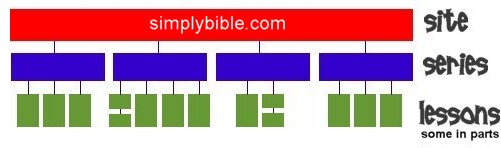
There are hundreds of pages on this site. Obviously the site needs a sensible structure. So what is it? Let's start at the top and work downward...
- Level 1 site —At the top level, of course, is the entire site.
- Level 2 series —The site is divided into topical series (sets of lessons).
- Level 3 lessons —A lesson is usually one single unit, but sometimes I have to split a long study into two, making one lesson part 1, and the other part 2.
Each page will present you with tabs and icons that can take you to the “NEXT” lesson, or a “LIST” of all the lessons in the series with a synopsis of each lesson. These links are in the banner and footer including the first few icons in site navigator.
Cross Referencing
Although simplybible.com is organized in this top-down vertical manner, you are not required to step up and down the structure if you don't wish to. Another principle in the way the site is put together is that you can move “horizontally” between pages located in different series and lessons but which are related in what they discuss. Each page will have relevant links for this purpose.
Better still, the search engine simplybibleFinder (SiFi) is directly accessible on every page. It is not the slightest interested in vertical structure, but in the association of ideas. Give it topics to search, and the engine will list selected pages from all over the site under topical headings.